Made for the feed you won’t remember.
A warm dark mode, so the screen isn’t the brightest thing in the room. The last feed is the first thing you see, and logging the next one takes a thumb and three seconds.

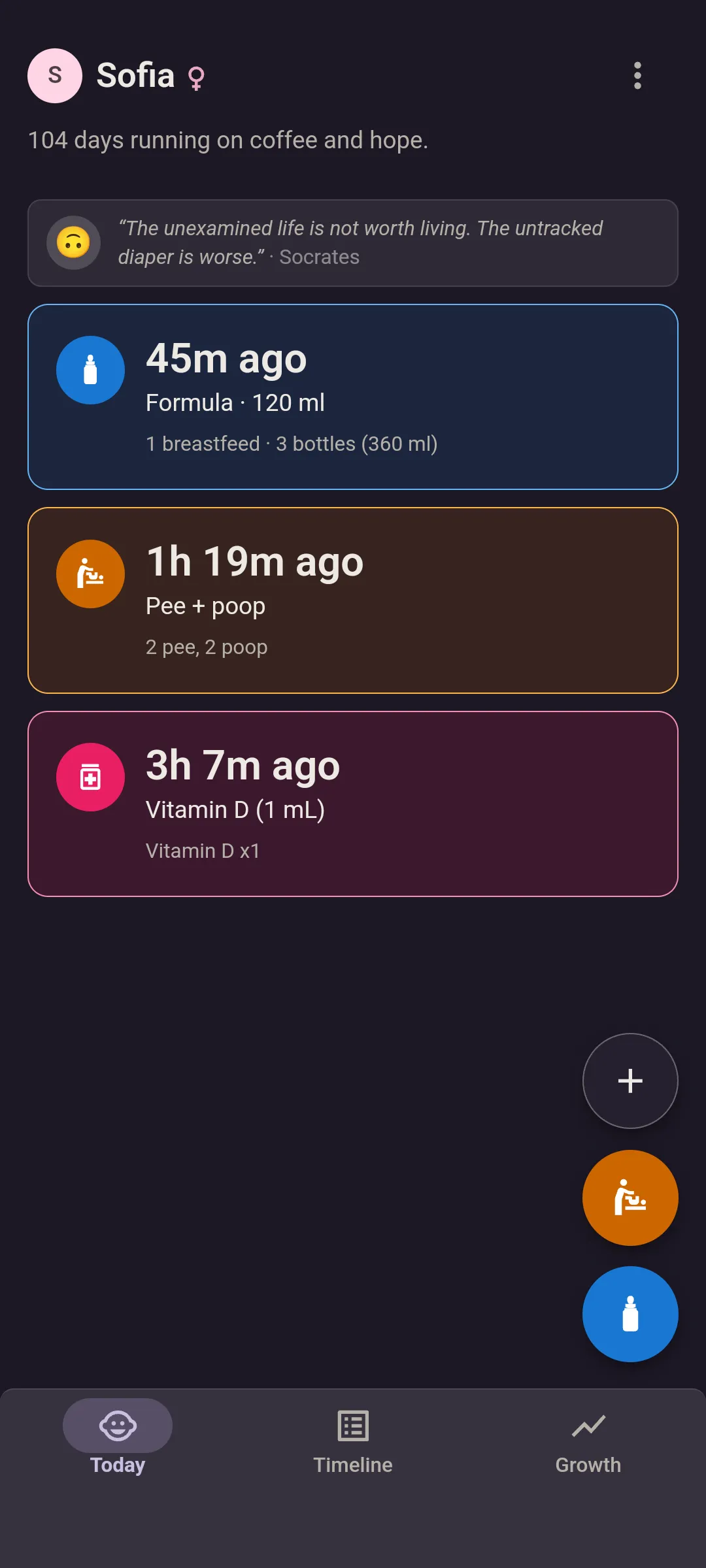


A dark mode you can open with the lights off.
Most dark modes are bright white on pure black. Fine at a desk. In a dark nursery, a baby tracker like that is a flashlight. This one’s a deep, warm violet with every color turned down to match, so it doesn’t glare in a room where someone’s finally asleep.
- Light, dark, or follow your phone.
- Your partner picks their own. One of you dark, one of you light, same log.
Dark mode’s free.
Log it with the hand that’s free.
Everything you need at 3AM sits at the bottom of the screen, and the feed opens on whatever your baby usually has.
- Open.
On Android, long-press the app icon to jump straight to logging a feed.
- Tap.
Feed and diaper sit bottom right, under your thumb. A diaper is one tap and save.
- Pick.
Formula, 120 ml, save. Same bottle as last time? One tap.
Fed her at 3:10 and remembered at 3:40? Change the time before you save. And if you log the same feed twice in half an hour, the app checks with you first.
Formula in ml or oz. Breastfeeding left, right or both, with the minutes if you want them. Solids by food. Medicine with the dose, and your recent ones a tap away so you’re not typing in the dark.


It’s on screen before you’re awake.
Open the app and there it is. Nothing to tap through.
- Last feed. How long ago, what it was, and today’s total so far.
- Last diaper. How long ago, pee, poop or both, and today’s count.
- Your latest medicine or sleep. The dose, or how long they slept. Sleep is Premium. The medicine log
Opens instantly. Even with no signal.
Dead spot in the nursery? Log it anyway. It sends when you’re back.
Reminders, if you want them.
Pick an interval for feeds, diapers or medicine, and your phone nudges you once it’s been that long since the last one. They’re free, and they stay off until you switch them on.
- Today lights up too. Once the time’s up, that card is highlighted.
- You set the timer. The app never suggests a schedule.
Questions about night feeds.
Is dark mode free?
Yes. Pick light, dark, or whatever your phone uses. The dark theme is warm, so it won’t blind you at 3AM.
Is there a home screen widget?
Yes, in the Android app, and it’s free. It shows how long since the last feed and diaper, ticking every minute, with the time it happened beside it. Your partner’s logs show up on it within about 15 minutes, even with the app closed. With Premium, you log from it too, without opening the app: every type you track, with the same amounts, sides, doses and notes as the app. Tap 120 ml and it’s saved, with Undo if your thumb slipped. Photos stay in the app. Twins get a widget each. There’s no widget in the browser version. On a Wear OS watch, the tile shows the same two times, and logging from it is free.
Is there a watch app?
Yes, for Wear OS, and it’s free. A tile shows how long since the last feed and the last diaper, counting up, and the watch app adds who logged each. A watch-face complication keeps the time since the last feed in view. Logging is two taps from the tile: bottle, left, right or both for a feed, pee, poop or both for a diaper, with Undo. No signal? It saves on the watch and sends later. Your partner’s logs reach it within seconds, or within about 15 minutes if the push is held up. Pair it once with a code you approve on your phone. Twins? Pick the twin on the watch. Any watch on Wear OS 4 or later works: Pixel Watch, Galaxy Watch4 and newer. Apple Watch? Not yet.
What does the Today screen show?
How long since the last feed and the last diaper, with today’s totals, plus your latest medicine or sleep. That’s “when did she last eat?” answered at a glance.
See you at the next 3AM feed.
Dark mode, reminders and offline logging included.